Prism · Loan servicing platform
Loan servicing, investor reporting and borrower self-service on one platform
Three connected web applications for your staff, your borrowers and investors, and your sales team — one shared record in the browser, in place of desktop tools, spreadsheets and printed mail.
Runs in the browser
Several companies, one sign-in
Borrower & investor portal
Why Prism
One web platform in place of desktop tools, spreadsheets and printed mail
Work from anywhere
Staff use a browser instead of software installed on each PC. Every company, loan and investor is in one place.
Self-service
Borrowers and investors see their loans, statements and payments in a secure portal instead of calling or waiting for mail.
Rules built in
Deadlines, approvals and checks from the servicing guides run inside the screens, with an audit trail.
The platform
Three applications, one shared record
For staff
Prism
Servicing, payments, collections, investors, custodial accounting, escrow, asset management, setup and administration — fourteen work areas from boarding to year-end.
For customers
Prism Portal
Borrowers see their loan, download statements, request payoffs and enroll in autopay. Investors follow their portfolio, distributions, income and offerings.
For sales
Prism Prospects
Grow your servicing book: find and score lenders, track opportunities, price them and estimate revenue.
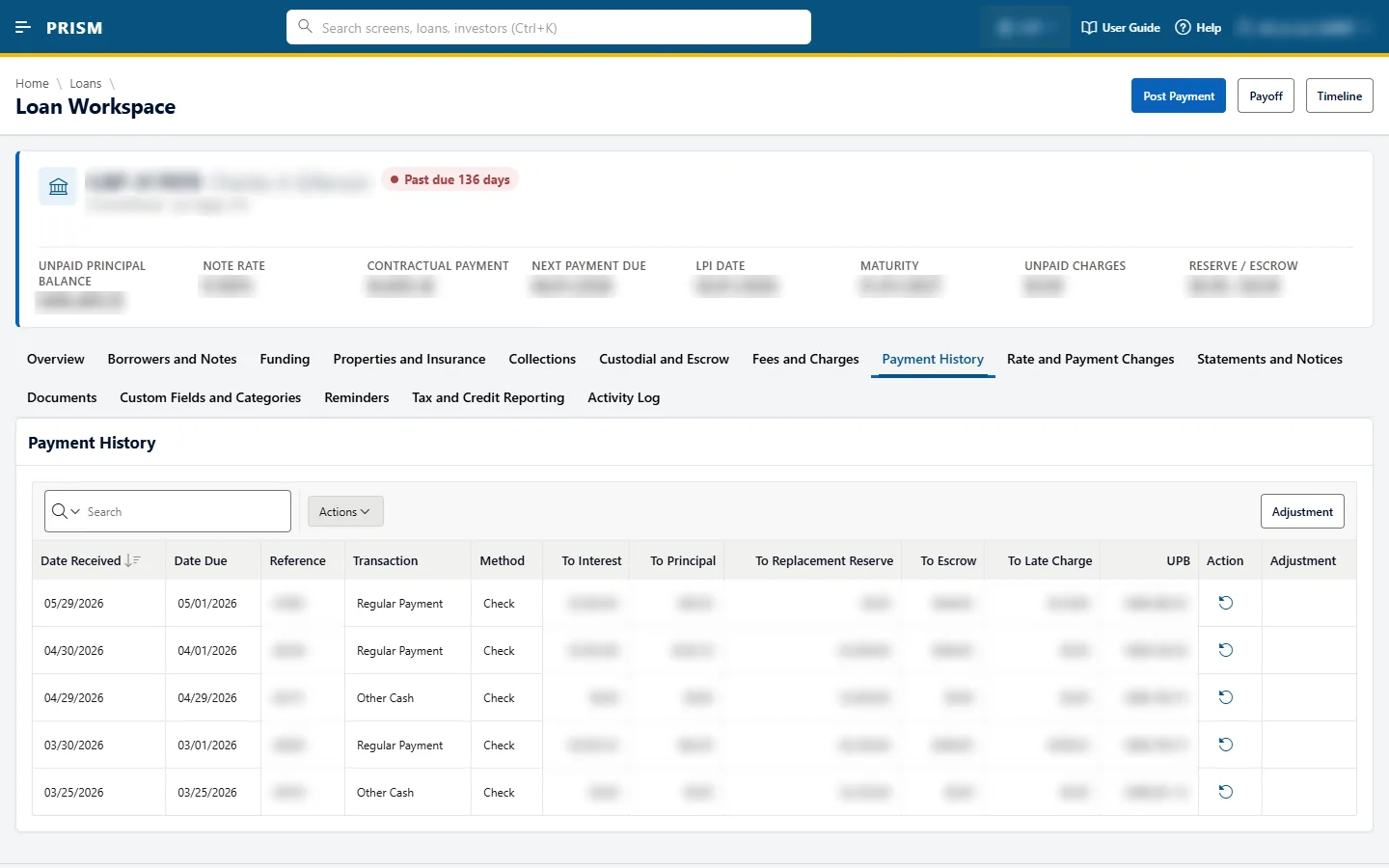
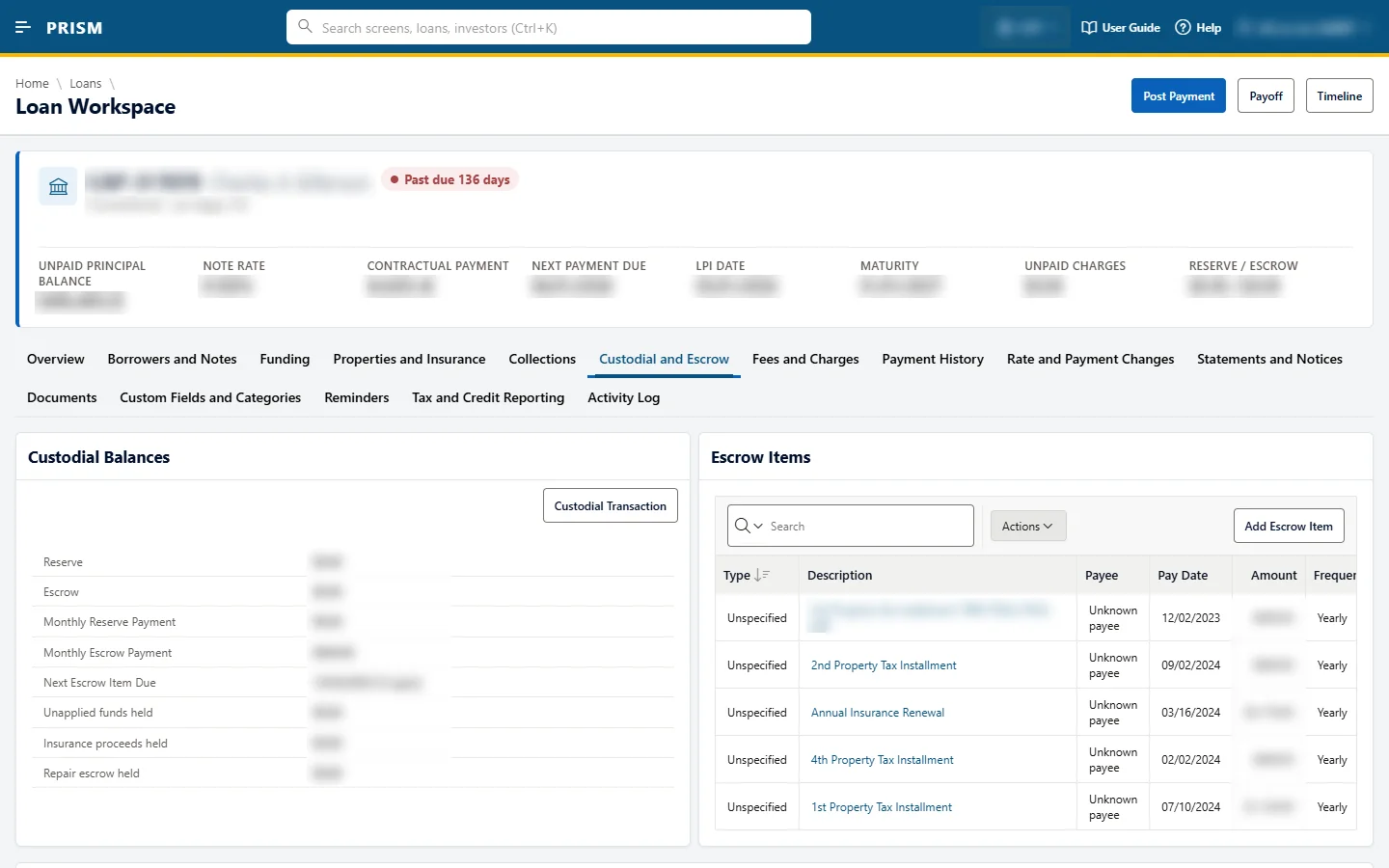
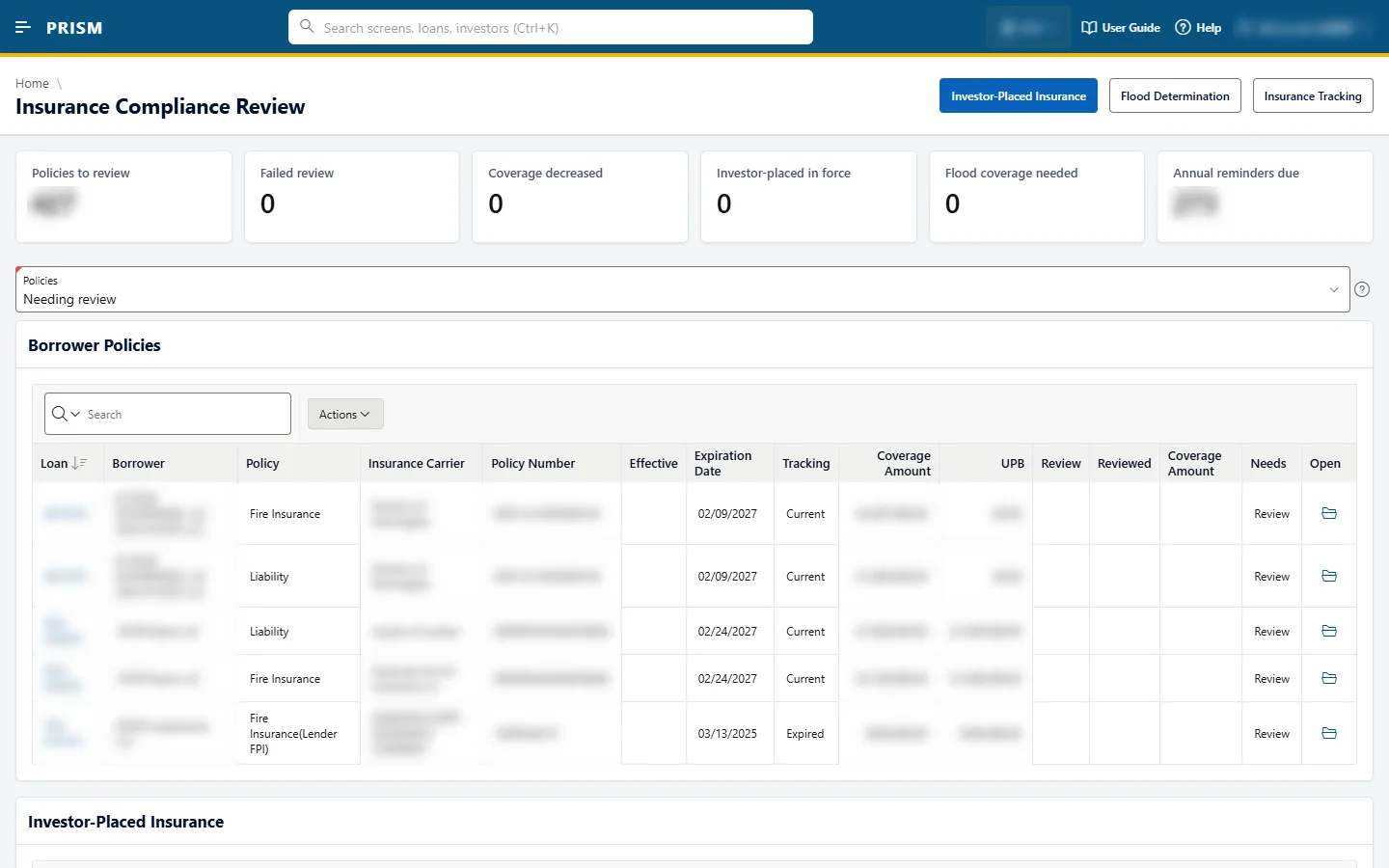
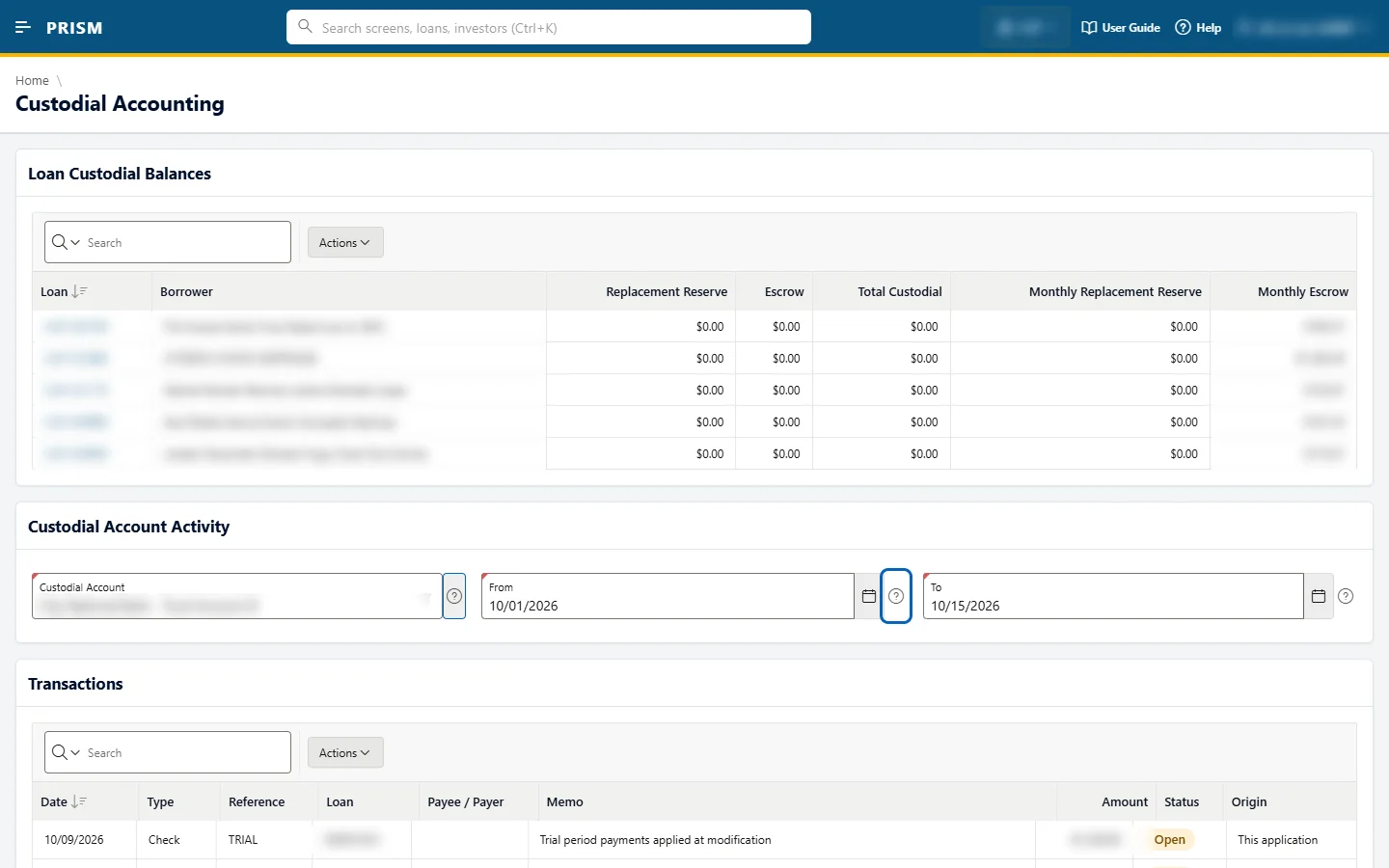
A loan’s life in Prism
From boarding to payoff without leaving the platform
01
Board
Add the loan, borrower, property, investors and products, one at a time or in bulk.
02
Bill and collect
Statements, payment posting, batches and autopay, with reminders when a payment is late.
03
Pay investors
Distributions, checks and custodial accounts, reconciled against the bank.
04
Protect the asset
Escrow, insurance, taxes, inspections and construction draws.
05
Work the exceptions
Collections, workouts, military indulgence, bankruptcy, maturities and extensions.
06
Close out
Payoff statements, transfers and year-end tax forms for borrowers, investors and vendors.
What Prism covers
Fourteen work areas, from boarding to year-end
Loan Servicing
Loans, boarding, properties, reminders, portal
Investors
Investors, distributions, checks, dashboards
Payments and Billing
Posting, batches, autopay, billing
Custodial Accounting
Bank accounts, register, reconciliation
Asset Management
Exceptions, maturities, concentration
Escrow and Reserves
Balances, items, analysis, reserves
Construction and Collateral
Draws, inspections, values, taxes
Rates, Changes and Transfers
ARM, payoffs, transfers
Collections and Default
Workouts, SCRA, bankruptcy
Documents and Reporting
Statements, notices, tax forms
Insurance
Policies, compliance, loss drafts, MI
Servicing Setup
Settings, products, rules, workflows
Data and Documents
Custom fields, lookups, storage
Administration
Users, roles, sign-in, API, logs
Who uses it
Eight roles, several companies, one sign-in
Viewer
Read loans and dashboards
Servicer
Loans, payments, escrow
Collector
Collections and default
Accounting
Investors, custodial, tax forms
Asset Manager
Exceptions, construction, collateral
Supervisor
All operations and approvals
Administrator
Everything, including users
Sales
Prism Prospects only
How access works
- Roles combine, so one person can be Servicer and Collector.
- Staff see only the menu areas their roles allow, and every screen enforces the same rule.
- Run several companies from one sign-in; lists and dashboards show the chosen company’s portfolio.
Prism Portal
Borrowers and investors answer their own questions, any time
For investors
Their portfolio, live
- Portfolio dashboard with charts that drill down to the loans behind each figure
- Balance, status and payment history for every loan they fund
- Distributions, income and tax: what was paid and when, with reports and downloads
- Offerings and calculators, switched on per company when ready
For borrowers
Self-service
- See their loan, balance and payment history
- Download statements and notices
- Request a payoff statement
- Enroll in autopay
Security first
Protected by design
- Accounts by staff invitation only
- Two-step verification by e-mail code or authenticator app
- No data shown until both steps are passed
- Lockout after repeated failed sign-ins
Staff have a matching investor dashboard inside Prism, so they see what the investor sees.
Asset management
See portfolio risk before it becomes a loss
Exception rules
Each company sets its own rules, and an investor can have stricter rules on the loans it funds. A command center lists every loan that breaks one.
Maturities and draws
Maturity milestones, exit plans and extensions, plus construction draws with inspections and approvals.
Concentration and rentals
Portfolio concentration limits with breach alerts, and rental loans tracked by unit, rent roll, occupancy and debt service coverage.
Statements and notices
Documents delivered by a secure link, not by e-mail
Step 1
Prepare
Staff prepare a run, include or exclude loans, and Prism checks for duplicates.
Step 2
Create PDFs
Each notice is built from a company’s own Word template and stored securely.
Step 3
Send
By print, e-mail or text, following each recipient’s delivery preference.
Step 4
Open
The recipient signs in to the portal to download it, and Prism records when it was opened.
The e-mail only says a document is ready. No personal or financial details travel by e-mail.
Workflow and connections
Work moves itself, and partners stay in step
Events
Important moments, such as a late payment or a maturity, are recorded once and drive everything else.
Workflows and tasks
Steps open tasks for the right role; overdue tasks escalate automatically.
Loan timeline
Payments, notices, messages and tasks on one timeline per loan.
Partner notifications
Partners are told the moment something changes, with signed messages that retry if a partner is down.
Partner access
Approved partners can read and send data, each within its own usage limits.
E-mail and text
Staff contact borrowers from the loan, and every message is kept.
Security and trust
Your borrowers’ and investors’ data stays protected
Two-step verification
Portal users pass a second step before any data is shown.
Access by role
Every screen checks the user’s role, and each role is tested screen by screen.
Nothing sensitive by e-mail
E-mails carry a secure link, never account or financial details.
Protected secrets
Passwords are stored only in protected form, and sign-in keys are encrypted.
Signed partner messages
Partners can confirm every notification really came from you.
Full audit trail
Changes, documents opened and messages sent are all recorded.
Getting started
From sign-up to your first portal user in six steps
1
Set up your companies
With letterhead details and sender e-mail.
2
Board your loans
Loans, investors and properties, in bulk or one by one.
3
Invite your staff
And give each person the roles they need.
4
Choose your rules
For exceptions, deadlines and approvals, or start from the defaults.
5
Add your templates
For statements and notices, or use the starter set.
6
Open the portal
Pick the services to offer and invite borrowers and investors.
See it with your data